


Warning: unlink(/var/www/html/webstore/upload/storage/cache/cache.19948fe4e3de52f07139c6ffc3894c7f.sub_category.1786023950): No such file or directory in /var/www/html/webstore/upload/system/library/cache/file.php on line 17Warning: unlink(/var/www/html/webstore/upload/storage/cache/cache.42fe28c96658da250ca35f964b08e7bc.custom.1786023952): No such file or directory in /var/www/html/webstore/upload/system/library/cache/file.php on line 17Warning: unlink(/var/www/html/webstore/upload/storage/cache/cache.ff44bda1b19a3cde995e28b0fc451db0.custom.1786023950): No such file or directory in /var/www/html/webstore/upload/system/library/cache/file.php on line 17Warning: unlink(/var/www/html/webstore/upload/storage/cache/cache.ff44bda1b19a3cde995e28b0fc451db0.manufacturer.1786023950): No such file or directory in /var/www/html/webstore/upload/system/library/cache/file.php on line 17Warning: unlink(/var/www/html/webstore/upload/storage/cache/cache.ff44bda1b19a3cde995e28b0fc451db0.sub_category.1786023950): No such file or directory in /var/www/html/webstore/upload/system/library/cache/file.php on line 17 SS0750 Plug-in Stacking Manifold for Input & Output EX250- S Kit - SS0750 Plug-in Stacking Manifold for Input & Output EX250, S Kit
Quick Links


Place here any module, widget, design or HTML. for example menu, categories

IIDM

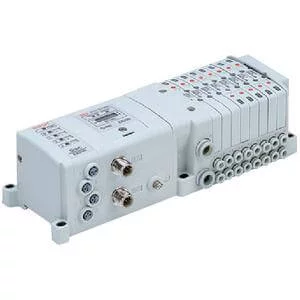
SS0750 Plug-in Stacking Manifold for Input & Output EX250- S Kit - SS0750 Plug-in Stacking Manifold for Input & Output EX250, S Kit

  • Brand: SMC
  • Product Code: SS0750 Plug-in Stacking Manifold for Input & Output EX250- S Kit
Description: SS0750 Plug-in manifold with EX250 serial transmission unit.  EX250 allows connection up to 32 solenoids along with 32 inputs per node.  Available protocol include EtherNet/IP™, DeviceNet™, CANopen, and AS-I.
Configuration Options
  
 
Select Product Options
Select values from the drop down lists or make appropriate selections to configure the part number.
Stations Configuration Status
Cylinder Port Size Configuration Status
P, R Port Size Configuration Status
Kit Configuration Status
SI Unit COM. Configuration Status
Input Block Configuration Status
Input Block Type Configuration Status
Input Block COM Configuration Status
Option 1 Configuration Status
Option 2 Configuration Status
Options in:
  • Gray are not compatible with other selected option value.
  • Red conflict with another selected option value.
  • Amber are not recommended.
  • Series Catalog

    Download
  • CAD Download

    Download